
E Paper Display Tablet in Different Light: What to Check Before You Choose
Will the Screen Be Clear in the Places You Actually Read?
An e paper display tablet can be easy to read in strong daylight but difficult to use in a dim room. The deciding factors are the light reaching the screen, reflections from nearby sources and whether the specific device has a front light. Before choosing, check visibility outdoors, at your usual desk and in the darkest place where you regularly read.
Use a page of ordinary text rather than a product photograph. Look at it from your normal reading distance, then notice whether you need to tilt the screen, enlarge the text or move closer to a lamp. The weakest everyday lighting condition is often the most useful one to test.
Bright Sunlight Does Not Mean a Glare-Free Screen
Reflective displays use ambient light to make the page visible, so bright outdoor conditions can provide plenty of illumination. But a well-lit screen is not automatically free from reflections. Sunlight catching a particular angle, a nearby window or a glossy protective surface may still obscure part of the text.
Consider a hypothetical lunchtime reading session on a terrace. The page might be clear when angled towards open sky, yet show an intrusive reflection when tilted towards a sunlit window. Turn the device slightly and check whether the letters remain legible without an awkward holding position.
When assessing an e paper display tablet in direct sunlight, look beyond the central part of the page. Fine print, lighter text and the edges of the display can reveal visibility problems that a large heading conceals. A brief test from a normal seated position is more informative than an idealised outdoor product image.
At a Desk, Light Comes from More Than One Direction
An office presents a different challenge: competing light sources. Ceiling fixtures, windows and desk lamps may illuminate the page unevenly or appear as reflections, particularly when a device is placed flat rather than held upright. Afternoon sunlight can also change a desk setup that worked well in the morning.
When considering paper-like tablets for writing and reading, picture the location where the device will spend most of its time. A desk directly beneath a ceiling light may call for a different viewing angle from one beside a window. Check both positions before deciding whether the reflective screen visibility suits your work.
For a practical office check, place a normal page in the position you would use for ten minutes. If a bright reflection crosses a paragraph, move the lamp or tilt the screen once. If the problem returns whenever you settle into a natural posture, treat that as a limitation of the setup rather than assuming it will disappear with practice.
A Dim Room Changes the Decision
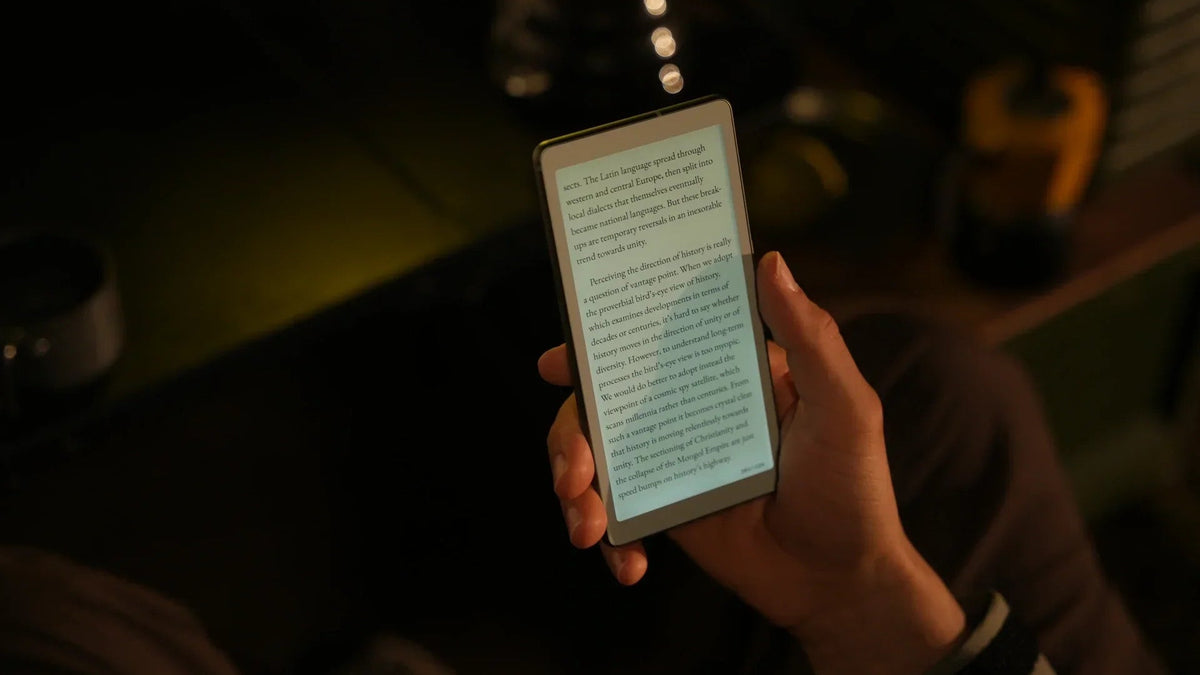
A reflective screen without illumination cannot be read in complete darkness. In a bedroom with a shaded lamp, visibility depends on how much light reaches the page and where the lamp sits. Task lighting may be entirely adequate, but a lamp behind the device or one casting a strong shadow can make text harder to follow.
A front light offers another option by illuminating the display surface. It is not the same arrangement as a conventional LCD backlight, which sits behind the display. More importantly, front-light availability differs between models; it should never be inferred from the words “E Paper” alone.
VIWOODS EU's official paper tablet comparison confirms that AiPaper Mini has a front light, while AiPaper does not. If reading matters more than handwriting, the AiPaper Reader also offers adjustable front lighting. The choice depends on both your lighting conditions and whether you need a stylus for notes or document markup.

One Page, Three Lighting Conditions
Different pages can produce misleading impressions. A bold headline may look clear in poor light while smaller body text remains difficult to distinguish. To compare E Paper lighting conditions fairly, use the same document, similar text size and the same reading distance in each place.
Look at ordinary paragraphs, light grey details and any small labels that matter to your reading. Check the page upright and at the angle you would naturally use on a desk. If a reflection clears with a small movement, that may be a workable adjustment; if it requires holding the device unnaturally, it is less useful.
Where text size is adjustable, make a reasonable change before rejecting the screen. Keep the adjustment consistent across locations, though, or you may mistake larger lettering for better lighting performance.

Once the page is readable, the next question is how to use it well. The related guide on how to build a focused reading session covers the reading routine rather than the lighting decision.
The Lighting Condition That Matters Most
Daylight results matter little if the device will mostly be used in a dim bedroom. Likewise, someone working in a consistently well-lit office may have no need for a built-in front light. The choice should follow the least favourable condition that occurs regularly, not the brightest place where the screen looks impressive.
Consider two hypothetical routines. One person reads reports beside a desk lamp and occasionally outside; reliable ambient lighting may be sufficient. Another reads on an evening train and in a room where a separate lamp is inconvenient; that person has a stronger reason to prioritise a model with its own front light.
This distinction is especially relevant when comparing the Viwoods AiPaper and AiPaper Mini paper tablets. Even when you know which model has a front light, specifications cannot tell you whether an overhead fixture or nearby window will create distracting reflections at your desk.
The Model Detail Worth Checking Before You Order
Before deciding, revisit the latest product information and confirm whether the exact model includes a front light. Then check the lighting you cannot easily change: an evening reading chair, a desk under overhead fixtures or an outdoor position used regularly. Product imagery alone cannot establish how reflections and contrast will behave in those spaces.
Ready to narrow down your options? Compare AiPaper and AiPaper Mini, or explore AiPaper Reader if front-lit reading is your main priority.
Frequently Asked Questions
Does a reflective display work in a completely dark room?
Not on its own. A reflective display needs light, either from the room or from a built-in front light if the model has one.
Can changing the viewing angle help with reflections?
Yes. A small tilt can move a reflection away from the text, although it will not solve every overhead-light or window arrangement.
Is a front light the same as a backlit screen?
No. A front light illuminates the face of a reflective display. A conventional LCD backlight illuminates the display from behind.



Leave a comment
This site is protected by hCaptcha and the hCaptcha Privacy Policy and Terms of Service apply.